Australian roots. Global possibilities.

Mallevar OS

A local-first operating system for desktop, mobile and AI workflows. One ecosystem that keeps your data close, your agents accountable, and your work moving — whether you're online or not.
People Privacy Progress A brighter Australia
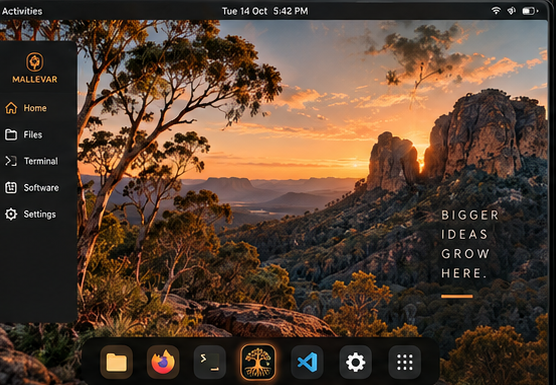
Mallevar OS desktop: a Plasma workspace with the Mallevar dock, Files, Terminal, Software and Settings, over an Australian bush sunset wallpaper.

Brand principles

Built the way software should be held

Four commitments shape every surface, every package and every decision in the tree.

Local-first

Your data, your ground. It works offline and keeps your data close. Designed for Australian users and beyond.

Private by design

Control comes standard. Minimal data collection, transparent by default. You're in control.

Modular

Adapt to your workflow. A unified, composable system. Only what you need — built to grow with you.

Built for real work

Not just chat. Tools, agents and workflows for people who do — from bush to boardroom.

Surfaces

Every screen starts somewhere honest

Boot, login and first-run are part of the product, not an afterthought bolted on afterwards.
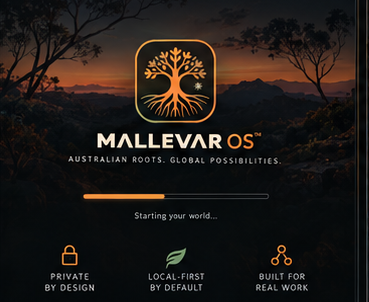
BootFast · Secure · Locally yours
Mallevar OS boot screen: the mark over an Australian bush sunset, a thin amber progress bar reading 'Starting your world…', and the values Private by design, Local-first by default, Built for real work.
LoginYour world · Your control
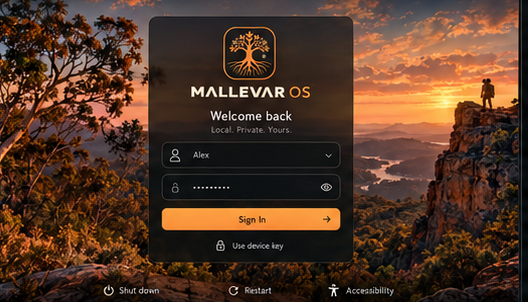
Mallevar OS login: 'Welcome back — Local. Private. Yours.' with an account selector, password field, device key option and an amber Sign In button.
WelcomeA smooth start to bigger things
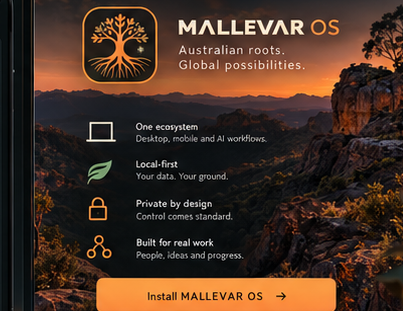
Mallevar OS first-run welcome: one ecosystem for desktop, mobile and AI workflows; local-first; privacy by design; built for real work; and an Install Mallevar OS button.

A beautiful, focused workspace

NATIVE · FLEXIBLE · YOURS

The desktop is a Plasma Wayland session with a dock built for the way the system actually works — Home, Files, Terminal, Software, AI Studio and Settings, one keystroke apart, with the bush rim behind your windows rather than a stock blue gradient.

Welcome, then out of the way

ONE ECOSYSTEM · DESKTOP, MOBILE, AI

First run explains the four principles once, offers the install, and links the release notes. No account wall, no upsell carousel, no telemetry consent dark pattern.

Roots — your agent environment

Orchestrate agents, tools and workflows

A request becomes a plan, the plan fans out to specialists, and the result comes back as something you can use — with the reasoning visible the whole way.
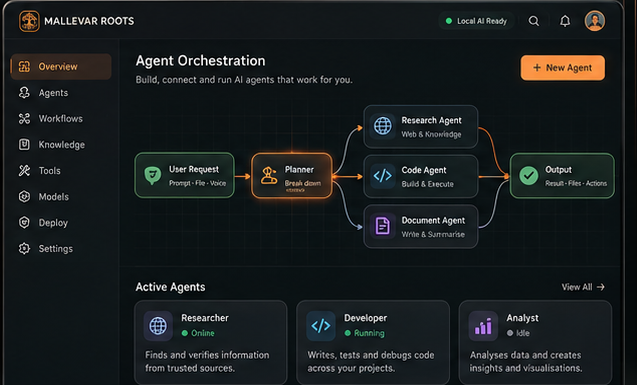
Mallevar Roots: Agent Orchestration. A user request flows to a Planner, which fans out to a Research Agent, Code Agent and Document Agent, converging on Output — ready for actions. Active agents: Researcher (online), Developer (running), Analyst (idle).
  1. Step 1User RequestPrompt · file · voice
  2. Step 2PlannerBreak down
  3. ResearchResearch AgentWeb & knowledge
  4. BuildCode AgentBuild & execute
  5. WriteDocument AgentWrite & summarise
  6. ResultOutputResult · files · actions
Researcher
Online

Finds and verifies information from trusted sources.

Developer
Running

Writes, tests and debugs code across your projects.

Analyst
Idle

Analyses data and creates insights and visualisations.

Roots reads and writes locally by default. Model routing, permissions and budgets stay under your control in Settings → AI & Agents.

Mobile — secure, lightweight, everywhere

Same roots. Further places.

Your world, in sync. The same files, notes, agent sessions and settings, on the phone in your pocket — with sync you can see and switch off.

Sync across devices

Three devices connected — a live count, not a promise in a settings file.

Focus mode

Silence distractions and choose what matters for the next block of work.

Local storage

Free space you own, measured on the device: 106.6 GB free of 256 GB.

Device key

Hardware-backed unlock, with the key held on the device rather than a cloud account.
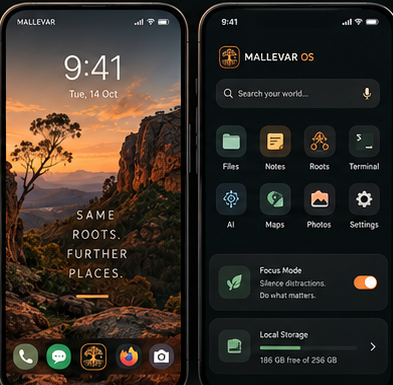
Mallevar OS mobile: a home screen over a bush sunset reading 'Same roots. Further places.', and a settings pane with account, sync, privacy, AI and agents, storage, appearance, security and about MALLEVAR OS v1.0.0.

The stack

Three sub-brands, one tree

Roots
Agent environment

Orchestrate AI agents, tools and workflows. Built for real work, not just chat.

OMP
Open model protocol

A unified way to run and connect models, locally and in the cloud.

Hermes
AI workflow engine

Fast. Flexible. Built for developers. Turn ideas into working systems.

Brand system

Warm, grounded, and quiet

The identity is drawn from the Australian landscape — charcoal night, warm amber, sandstone, eucalyptus and soft cream. Five colours, two typefaces, nothing else.

Charcoal
#0F1412
Depth, focus, clarity
Warm amber
#FF8A3D
Energy, warmth, Australian spirit
Sandstone
#D7B896
Earth, stability, enduring foundations
Eucalyptus green
#6BBF6F
Growth, balance, Aussie landscape
Soft cream
#F4E9D7
Clarity, readability, open possibility
Headline / Display — Space Grotesk
Mallevar OS
A B C D E F G H I J K L M N O P Q R S T U V W X Y Z  0 1 2 3 4 5 6 7 8 9
UI / Body — Inter
A local-first operating system
Aa Bb Cc Dd Ee Ff Gg Hh Ii Jj Kk Ll Mm Nn Oo Pp Qq Rr Ss Tt Uu Vv Ww Xx Yy Zz  0 1 2 3 4 5 6 7 8 9
The Mallevar mark: a tree with deep roots inside a rounded square, drawn in warm amber.
Mallevar OS™
Australian roots. Global possibilities.
Primary logo lockup — icon, wordmark and tagline
Monochrome Mallevar mark.
Mallevar OS
Australian roots. Global possibilities.
Monochrome — single-colour and print use
The Mallevar app icon: the tree mark sized for system trays and app stores.
App icon
Favicon · tray · shortcuts
Optimised for system trays, app stores and shortcuts

Status

What ships today

Mallevar OS is delivered as signed packages for Debian trixie, together with a live-build profile for the install ISO. This page describes the current build honestly, including what is still ahead.

Release Version 1.0.0 — preview build. Packages are signed; availability is arranged per installation. Preview
Desktop Plasma / Wayland session, KDE Connect, firmware updates, power profiles and OCR support. Ready
Branding System defaults and the Mallevar look-and-feel, GRUB, Plymouth, SDDM and icon themes. Ready
AI layer Local AI runtime plus the broker service — a loopback proxy with an audit log, reachable only from the machine it runs on. Ready
Agents Pre-wired agent CLIs and skills, packaged and discoverable from the command line. Ready
Roots orchestration The planning and routing lane is in progress: cancellation, failure reporting and artifact hand-off are being made consistent before more executors are added. In progress
APT archive No public Mallevar archive is published yet. Systems use the Debian mirrors and take Mallevar packages from the install image. Not yet